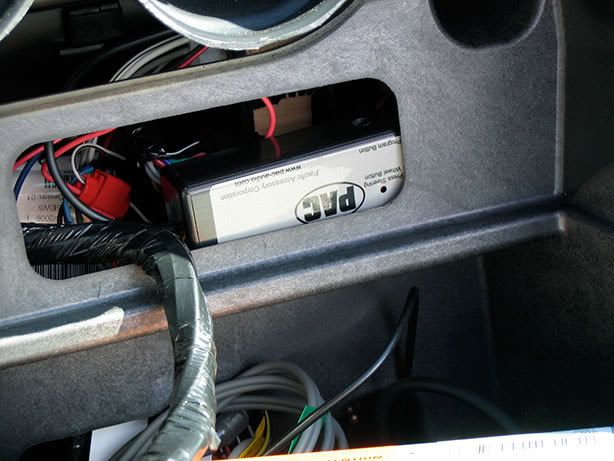
Steering Wheel Adapter SWIPS This was a fun one to work on. First of all they have the connectors backwards in the instructions connector 1 is really connector 2 and vice versa. Everythig else seemed to be in good order though. The green wire from the SWIPS gets connected to Pin 14 (blue wire) of the vehicle wire harness. Just take a knife, peel back a bit of the wire covering and use a tap in connector. The Red wire gets a 12v acc and black to ground as usual. The other wires may be left alone or trimmed as they are not needed. Keep the 2 loops of wire in tact though (brown and purple). With this installed I started to "program" the unit only to find out that it was not working as instructed. After some choice words and a stiff iced tea I looked over the install sheet again. It seems I neglected to notice the extra install note for the Solstice that read (attach Pin 11 on C2 (White wire with black stripe) to accessory 12 volt source. After I calmed myself I tapped into that connector on the vehicle harness and everything worked out as planned. Here is a shot of where I decided to install the unit. easy access if I ever need to reprogram it.
Next up was the rear view camera. The accessory box mounted easily. Take the 12V and ground (that you made in the earlier wiring harness step) and crimp / solder your connections. I mounted my box with velcro to try and stop and rattles.

Now in order for the really cool part to work you need to find a circuit that will change when the vehicle is placed in reverse. This hookup will turn the camera on when you start to backup. I could not find an easy one, so I just decided to use the passenger side backup light. Little did I realize that you need to take off the fender well and mud flap in order to get to it. The wire I tapped into was green and goes to the reverse lights. The red arrow points to the connection. The wire was then run down the passenger side of the trunk behind the carpet and down the center waterfall compartment. It passes under this and hooks up to the radio behind the dash. (There is a hookup for the reverse light in the passenger footwell area as well Green wire)

As for mounting it, I took off the license plate and stuck the camera to the car with the supplied sticky tape. I then put the license plate over the tab to help hold the camera in place. Here is a view from the side to see how small and unobtrusive it is.

I was unable to fully locate the VSS wire and I was getting tired so I opted to leave that out. Putting everything together was fairly easy and the final results are amazing.
And for my "Hackers" fans, It looks crispy in the dark too:

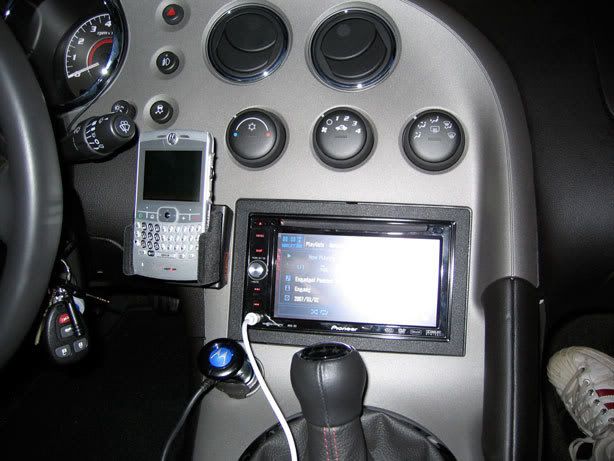
iPod cable is plugged into the unit and sits in the glove box for now. Not sure if I want to put it somewhere else. When the sirius and Bluetooth adapters are done being backordered I will update my posts with pics and how to info. The hardest part is going to be finding some more space behind the dash to stuff everything. It's really jammed back there now. I have a few scrapes on my hands from wedging them through the small openings feeding the stereo harness back there.
GPS Antennae Placement - The GPS antennae is actually in the center waterfall behind the trim piece. There is a small shelf on the top of the waterfall storage compartment behind the trim. It fits perfectly there and is totally out of the way. Signal reception is perfect. The white wire you see in the pictures is from my old install, it's a dock connector to 1/8" jack iPod cable. I was just using it to test the front AV jack. I'll see if I can get a quick picture of the GPS antenna. If it's too much I will shoot one when I install the Sirius unit (on Backorder) I also have some VSS wire info although I did not hook mine up. Maybe if someone can track this to an easier access point I will give it a try.
Manual Trans 2007 GXP:
VSS High signal Yellow wire to Pin 53 of connector C2 (58 Pins) of ECM
VSS Low signal Purple wire to pin 40 of connector C2 (58 Pins) of ECM
Here are some pics of the GPS (and Sirius when it arrives) antenna install Position. The first pic shows where they are installed. The other pictures are taken looking down from there.
Trim pulled back showing location of antenna:

Here is the little "shelf" that works out perfectly for the GPS antennae. I have an almost full signal according to the status bar on the radio.

Well today was more fun and excitement as I ripped apart my Solstice for the second half of the head unit upgrade. Here is how she looked with her interior ripped out for the second time, ready to start the day:

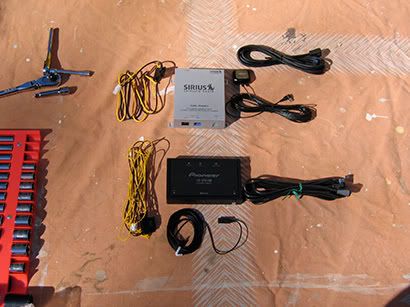
All that just to install this:
Things went fairly smoothly. After some test fitting and head scratching I decided to install the sirius unit behind the drivers seat trim panel. This worked out quite well as the hardest part was fishing the IP bus cable from the head unit to where I have the sirius installed. Few bloody knuckles, but all went according to plan. Here is the final resting place for the sirius adapter. I drilled 2 holes in the rear firewall and used a strip of HD velcro to hold the bottom of the unit firmly in place. I am confident that my unit will not come loose in adventurous driving conditions.
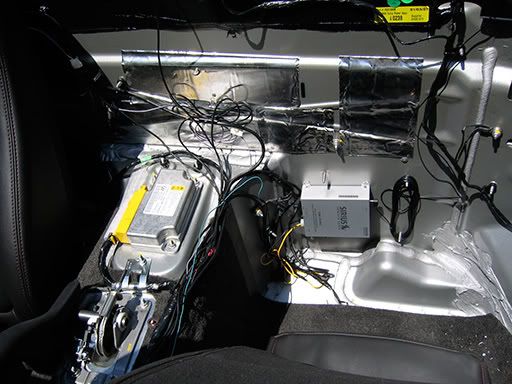
And here is a clearer shot of where I have the antennas installed. The reception is better in this location than it is in my Jeep (antennae is on the hood). Works great and I have had no issues with the unit while driving around today.

This install would have taken less time if I would have waited, but I'm impatient. Right now everything is working 100% and I am very happy. There are a few quirks with the Sirius adapter, (memo only works for songs not artists, and only 1 line display of info) but they are minor. Right now I have the bluetooth adapter tucked into the far right corner of the dash, to the right of the glove box. I may velcro it to the side if I see it is moving around, but right now it seems stable. The microphone wire was sNAK3D across the dashboard and up the drivers side windsheild pillar. I could figure out no great mounting options for the microphone so I taped it into the cutout for the onstar microphone. It seems to be working just fine and the people I talk to on the phone say they can hear me without problems. The bluetooth was easy to set up and I was able to transfer several of my contacts at one time over to the unit. I still have to read the manual to see all of the options and settings, but it's working and that's what's important.
All connections for constant 12v were made at the radio harness, (blinker relay, Sirius, BTB200) I am quite happy and hope that my instructions and tips here make things easier and more understandable for others. The Speaker and amp upgrade will come at the end of the summer (as long as no other catastrophes come about first).


